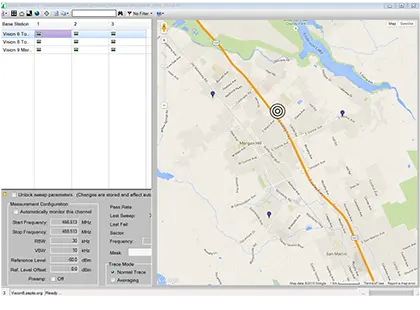
Vision MX280001A Remote Spectrum Monitoring Software
Windows PC software for monitoring, identifying and geo-locating interference signals with networks of Anritsu remote spectrum monitors.
- Operating system
- Windows 7/8/10/11
- Operating system architecture
- Microsoft Windows 64 bit operating system
- Compatible remote spectrum monitors
- MS27100A/01A/02A/03A, and MS27201A
- Compatible spectrum analyzers
- MS2090A, MS2080A, and MS2070A
Overview
Vision MX280001A is a software application for a Windows PC or laptop that works with Anritsu remote spectrum monitors (MS27100A, MS27101A, MS27102A, MS27103A and MS27201A) to monitor, identify and locate interference signals across a wide geographical area. It automates the collection of measurement data from multiple hardware probes and presents a combined view of spectral activity and network health.
Vision Monitor (Option 400)
Vision Monitor is the user interface for monitoring remote spectrum activity. It lists all deployed monitors with a graphic overview of system health and presents measurement data as spectrum traces, spectrograms, tables and plots, in real time or from history. Measurements can be captured automatically and uploaded periodically to a searchable database, allowing spectrum history to be kept over months or years and patterns of signal activity to be located. Threshold and trace-mask settings generate alarms, which are shown on a map of probe positions and can be sent as email alerts or as daily or weekly summary reports.
Vision Locate (Option 401)
Once an interferer or suspicious signal is identified, Vision Locate applies a geo-location algorithm to estimate the position of the source and displays it on an OpenStreetMap view. Historical alarm data can also be used to position past interference. Power of Arrival (POA) is used for low-bandwidth or non-modulated signals, and Time Difference of Arrival (TDOA) is also offered; both require three or more probes in the vicinity of the signal.
Additional Functions
The High-Speed Port Scanner (Option 407) scans multiple RF inputs and frequency channels on Anritsu remote spectrum monitors with a multi-trace viewer, limit lines and CSV logging. Coverage Mapping (Option 486) maps RSSI, channel power or occupied bandwidth over an outdoor area. Spectrum Occupancy, Signal Broadcast Identification and AM/FM demodulation and streaming are available with Option 400, and a free Scan Viewer utility is included for reviewing saved measurements.
Key Features
- Multiple probe management
- Accumulate spectrum history, identify patterns and trends for unusual signal activity
- Threshold setting, alarm generation, email alerts
- Searchable database for signals of interest
- Automated report generation
- Geo-location for interference or illegal/unlicensed signals
- View real-time signal activity throughout network
- High-Speed Port Scanner (option 407)
- AM/FM demodulation and streaming (included with Option 400, API format only)
- Coverage Mapping (option 486)
- Spectrum Occupancy (included with Option 400)
- Signal Broadcast Identification (requires Option 400)
- Cross-pol measurements for VSAT terminals
- Probe position visualization using OpenStreetMap
- Power of Arrival (POA) and Time Difference of Arrival (TDOA) geo-location
- Free Scan Viewer utility with spectrogram, max/min hold and video playback
- 3D spectrogram for .RSM and .CSM measurement files
Specifications
| Operating system |
Windows 7/8/10/11
Brochure specifies Microsoft Windows 64 bit operating system
|
|---|---|
| Operating system architecture | Microsoft Windows 64 bit operating system |
| Compatible remote spectrum monitors | MS27100A/01A/02A/03A, and MS27201A |
| Compatible spectrum analyzers |
MS2090A, MS2080A, and MS2070A
Vision Monitor (Option 400) and High-Speed Port Scanner (Option 407); Vision Locate (Option 401) supported on MS2090A and MS27201A
|
|
High-Speed Port Scanner firmware requirement
407
|
V2016.11.2 or higher
For customers upgrading Vision with the High-Speed Port Scanner
|
|
RF input ports per remote monitor
400
|
as many as 24 input RF ports |
|---|---|
|
Storage example
400
|
about 1 TB
30 day spectral history, 1,000 probes each uploading spectrum data every 15 minutes
|
|
Email alerts
400
|
Real time or summary reports on a daily or weekly basis |
|
Broadcaster information import
400
|
Spreadsheet (CSV format)
Signal Broadcast Identification
|
|
Geo-location algorithms
401
|
Power of Arrival (POA), Time Difference of Arrival (TDOA)
TDOA cannot be used for CW and other non-modulated signals
|
|---|---|
|
Probes required
401
|
three or more probes
Probes must be in the vicinity to detect the signal of interest
|
|
Unsupported instruments
401
|
MS2070A/MS2080A |
|
Refresh rate
407
|
typically less than one second
Scanning 12 RF IN ports; dependent on sweep settings (RBW/VBW) and network
|
|---|---|
|
Limit lines
407
|
Upper Limit and Lower Limit |
|
Measurement file format
407
|
CSV using either comma, semi-colon, or tab delimiter formats |
|
FM deviation
400
|
Up to 75 kHz, 5% Accuracy
Typical; Input Level > –90 dBm
|
|---|---|
|
AM modulation
400
|
0 to 100% Depth, 5% Accuracy
Typical; Input Level > –90 dBm
|
|
Audio file formats
400
|
.WAV or .MP3 |
|
Measurement types
486
|
RSSI, Channel Power, or Occupied Bandwidth
Requires Option 407
|
|---|---|
|
Export
486
|
Measurements can be imported into Google Earth |
|
Unsupported instruments
486
|
Field Master Pro Series MS2070A, MS2080A, MS2090A and Remote Spectrum Monitor MS27201A |
Applications
- Cellular operators monitoring spectrum at BTS stations
- Detection of illegal or unlicensed AM/FM/cellular broadcasts
- Sensitive site monitoring (national borders, military facilities, nuclear power plants)
- Airport monitoring
- Monitoring jails and prisons for illegal broadcasts
- Positive Train Control (PTC) channel monitoring
- Cable TV leakage mitigation
- Government regulators enforcing spectrum policies
- Remote monitoring of satellite terminals
- Spectrum occupancy studies to inform spectrum policy
- Interference monitoring at stadiums, malls and other large venues
- White space monitoring
- Indoor monitoring of board rooms, embassies and sensitive facilities
Included
- Scan Viewer utility
Options & Accessories
| Option | Description |
|---|---|
| 400 | Vision Monitor — User interface for monitoring remote spectrum activity; includes Spectrum Occupancy and AM/FM demodulation |
| 401 | Vision Locate — Geo-location of signals of interest using POA and TDOA; requires Option 400 |
| 407 | High-Speed Port Scanner — Scans multiple RF In ports and frequency channels with a multi-trace viewer |
| 486 | Coverage Mapping — Maps signal information over an outdoor area; requires Option 407 |
| MS27100A-0400 | Enable Vision Monitor on MS27100A |
| MS27100A-0401 | Enable Vision Locate on MS27100A — Requires Option 400 |
| MS27100A-0407 | Enable High-Speed Port Scanner on MS27100A |
| MS27100A-0486 | Coverage Mapping — Requires Option 407 |
| MS27101A-0400 | Enable Vision Monitor on MS27101A |
| MS27101A-0401 | Enable Vision Locate on MS27101A — Requires Option 400 |
| MS27101A-0407 | Enable High-Speed Port Scanner on MS27101A |
| MS27101A-0486 | Coverage Mapping — Requires Option 407 |
| MS27102A-0400 | Enable Vision Monitor on MS27102A |
| MS27102A-0401 | Enable Vision Locate on MS27102A — Requires Option 400 |
| MS27102A-0407 | Enable High-Speed Port Scanner on MS27102A |
| MS27102A-0486 | Coverage Mapping — Requires Option 407 |
| MS27103A-0400 | Enable Vision Monitor on MS27103A |
| MS27103A-0401 | Enable Vision Locate on MS27103A — Requires Option 400 |
| MS27103A-0407 | Enable High-Speed Port Scanner on MS27103A |
| MS27103A-0486 | Coverage Mapping — Requires Option 407 |
| MS27201A-0400 | Enable Vision Monitor — For MS27201A |
| MS27201A-0401 | Enable Vision Locate — For MS27201A |
| MS27201A-0407 | Enable Vision High-Speed Port Scanner — For MS27201A |
| MS2090A-0400 | Enable Vision Monitor — For MS2090A |
| MS2090A-0401 | Enable Vision Locate — For MS2090A |
| MS2090A-0407 | Enable Vision High-Speed Port Scanner — For MS2090A |
| MS2080A-0400 | Enable Vision Monitor — For MS2080A |
| MS2080A-0407 | Enable Vision High-Speed Port Scanner — For MS2080A |
| MS2070A-0407 | Enable Vision High-Speed Port Scanner — For MS2070A; the brochure also lists MS2070A-0407 as Enable Vision Monitor |
Documents & Resources
Related Products
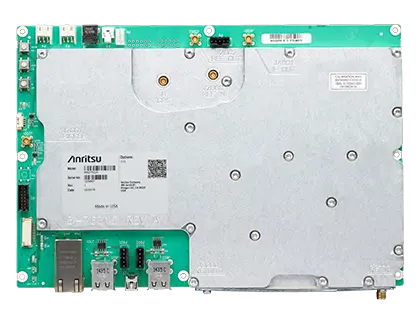
Compact OEM spectrum monitor module, 9 kHz to 6 GHz, for remote RF interference detection and spectrum occupancy monitoring.
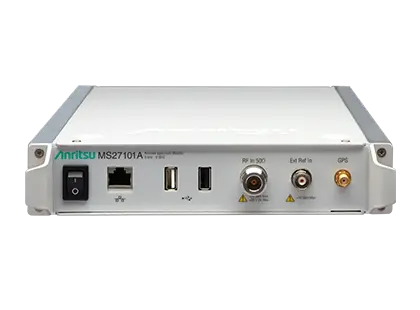
Half-rack, 1U indoor remote spectrum monitor covering 9 kHz to 6 GHz with sweep speeds up to 24 GHz/s and an integrated web server.
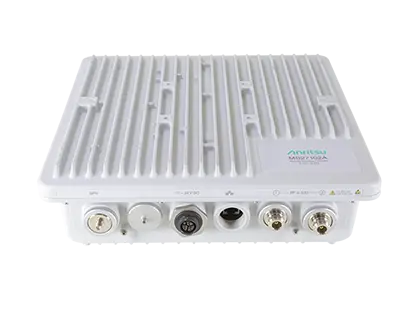
IP67 outdoor remote spectrum monitor covering 9 kHz to 6 GHz with sweep rates up to 24 GHz/s and 20 MHz instantaneous FFT bandwidth.
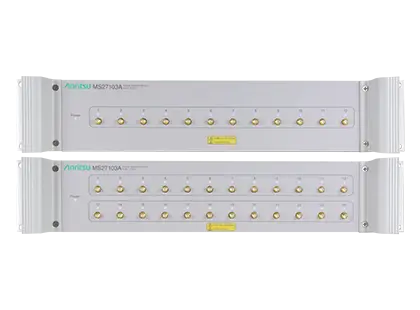
Rack-mountable 9 kHz to 6 GHz remote spectrum monitor with 12 RF inputs (24 optional) and sweep speeds up to 24 GHz/s.
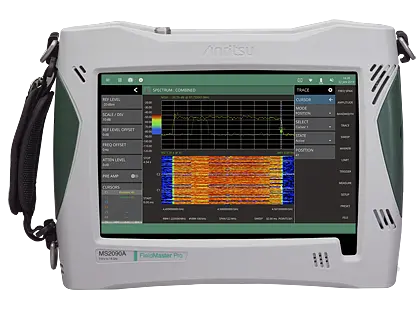
Handheld real-time spectrum analyzer covering 9 kHz to 54 GHz, with up to 150 MHz analysis and RTSA bandwidth.