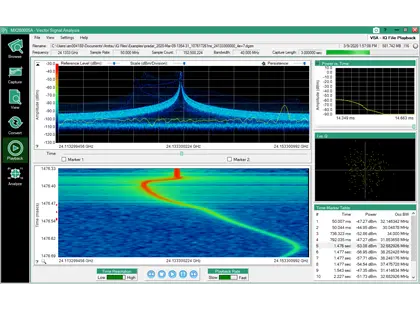
IQ Signal Master MX280005A Vector Signal Analysis Software
PC software for capturing, playing back, converting and analyzing IQ data from Anritsu spectrum analyzers, with modulation quality measurements.
- Supported spectrum analyzers
- MS2090A, MS27201A, MS2720T, MS2710xA, MS2080A, and MS2089A
- Signal generator for playback
- Anritsu MG3710E 6 GHz Vector Signal Generator
- Required analyzer options
- Option 124 or 126, and Option 128
- MS2720T IQ capture
- Option 24 supports the capture of IQ data with up to 32 MHz bandwidth
Overview
IQ Signal Master MX280005A is Windows PC software for post-processing and analyzing IQ data files captured on Anritsu spectrum analyzers, including the MS2090A, MS27201A, MS2710xA, MS2080A/MS2089A and MS2720T. It brings together the tools needed to capture IQ data files and then examine the nature of the captured signals in one user interface.
Operating modes
Modes in the application control the spectrum analyzer to capture or stream IQ data into PC memory over Ethernet or PCIe. Other modes browse IQ files with their metadata, preview captures, play back IQ data with high frequency and time resolution, and run modulation quality measurements. Additional modes cover scheduled auto capture from multiple analyzers, synchronous playback of time-stamped files, 5G frame spectrogram analysis, and a large file mode for recordings many gigabytes in size.
File conversion
A file conversion mode converts Anritsu .dgz IQ files to formats used by third-party software such as MatLab, and to the format needed for playback on an Anritsu MG3710E Vector Signal Generator. It also imports .wcap files captured on the MS2720T.
Licensing
The software is a free download. Browse, Capture, View, Auto Capture, Large File and 5G Frame Analyzer modes need no license. The IQ Player and IQ File Converter need a PC node-locked license or a USB dongle license. On the MS2090A, MS2710xA and MS27201A, IQ Signal Analyzer mode needs Option 128 installed in the instrument. On the MS2720T it needs a PC license or dongle.
Users
The software is intended for national RF spectrum regulators, security agencies and defense electronics companies that analyze RF signals captured in the field. It also suits organizations that monitor and protect RF spectrum from unlicensed operators or unintended sources of interference.
Key Features
- PC application for IQ data capture and post processing
- Compatible with MS2090A, MS2080A, MS27200A, MS27201A and MS2710xA spectrum analyzers
- IQ file browser with detailed view of IQ file metadata
- IQ data capture control from within the MX280005A GUI
- Basic IQ data viewer
- IQ Player offers high resolution Frequency vs Time display
- AM/FM demodulation
- Spectrum view of data window in capture
- IQ file format converter
- Continuous or single shot captures
- Modulation quality and analysis of common modulation standards
- Synchronous capture from up to 8 MS2090A analyzers with embedded time stamps
- Synchronous playback of up to four IQ files from four different analyzers
- Auto identification of points of interest such as IQ level or modulation format changes
- CCDF plot of power distribution
- 5G frame spectrogram with SSB locate tool
- Scheduled auto capture of IQ files from multiple analyzers
- Large file mode for analysis of very large IQ recordings
- Export of converted files to MG3710E vector signal generator over Ethernet
- Predefined parameters for common wireless communications standards
Specifications
| Supported spectrum analyzers |
MS2090A, MS27201A, MS2720T, MS2710xA, MS2080A, and MS2089A
Web page lists MS2090A, MS2080A, MS27200A, MS27201A and MS2710xA
|
|---|---|
| Signal generator for playback | Anritsu MG3710E 6 GHz Vector Signal Generator |
| Required analyzer options |
Option 124 or 126, and Option 128
Installed on the spectrum analyzer used to capture signals
|
|
MS2720T IQ capture
MS2720T
|
Option 24 supports the capture of IQ data with up to 32 MHz bandwidth
.wcap files imported and converted to .dgz with MX280005A-0005/0006
|
| Operating system | Windows 10 and 11 |
|---|---|
| Framework |
Microsoft .NET framework 4.5.2 or higher
vcredist_x64.exe may also be required
|
| PC to analyzer connection | Ethernet or PCIe |
|---|---|
| Capture control | Continuous (streaming), Fixed File Size (GB), Fixed Time Period (seconds) |
| Synchronous capture |
Up to 8 MS2090A simultaneously
Each MS2090A requires a PC running MX280005A
|
|
5G frame capture
MS2090A
|
Fixed 60 ms of 5G IQ frame data
MS2090A IQ 5G Frame capture feature
|
| Time resolution | As short as 160 ns |
|---|---|
| Synchronous playback |
Up to four IQ files captured from four different analyzers
Time stamps referenced to GPS receiver in the analyzers
|
| Demodulation | All AM or FM signals in the capture bandwidth |
| Native IQ files |
.dgz and .dgzm
Raw IQ data file and associated metadata file
|
|---|---|
| Conversion | dgz to wvd for playback with Anritsu MG3710E |
|
MS2720T files
MS2720T
|
.wcap
Converted to .dgz
|
| PSK/QAM/APSK formats (numeric results) | BPSK, QPSK, O-QPSK, π/4DQPSK, 8PSK, 16QAM, 32QAM, 64QAM, 128QAM, 256QAM, 512QAM, 1024QAM, 2048QAM, MSK, 16APSK, 32APSK |
|---|---|
| FSK formats |
2FSK, 4FSK, H-CPM
H-CPM used at APCO-P25 Phase 2 Inbound Measurement
|
| ASK formats |
2ASK
Graph display also supports 4ASK
|
| Numeric measurements (PSK/QAM) |
Tx Power, Filtered Power, Frequency Error (Hz, ppm), Vector Error (EVM) [Peak/RMS], Phase Error (Peak/RMS), Magnitude Error (Peak/RMS), Symbol Rate Error, BER, Specific Word (Hex), Origin Offset, Droop Factor, IQ Gain Imbalance, Quadrature Error, MER (Peak/RMS), Timing Offset
BER only when BER = On; some measurements limited to specific formats
|
| Graph displays |
Constellation, EVM vs Symbol, Magnitude Error vs Symbol, Phase Error vs Symbol, Trellis, Eye Diagram, I and Q vs Symbol, Magnitude vs Symbol, Phase vs Symbol, Signal Monitor, Symbol Table, Equalizer Amplitude, Equalizer Phase, Equalizer Group Delay, Equalizer Impulse Response
FSK formats add Frequency vs Symbol, FSK Error vs Symbol, Fidelity vs Symbol, Histogram
|
| Predefined standards | ARIB, IEEE 802.15, P25, DMR, dPMR, NXDN, TETRA, DVB |
| License-free modes | Browse Mode, Capture Mode, View Mode, Auto Capture Mode, Large File Mode, 5G Frame Analyzer Mode |
|---|---|
| Licensed modes |
File format Converter, IQ Playback Mode, IQ Signal Analyzer Mode
IQ Signal Analyzer Mode requires instrument Option 128 for MS2090A, MS2710xA and MS27201A; PC license or USB dongle for MS2720T
|
| License formats | PC node-locked license or USB dongle |
Applications
- National RF spectrum regulation
- Security agencies
- Defense electronics
- Spectrum monitoring and protection from unlicensed operators
- Interference hunting and analysis
- Spectrum archiving
- Pulsed radar frequency lock analysis
- 5G frame and SSB analysis
- Playback of captured RF signals to test receiver response
Options & Accessories
| Option | Description |
|---|---|
| MX280005A-0001 | IQ Player with PC node locked license |
| MX280005A-0002 | IQ Player with USB dongle PC license key |
| MX280005A-0005 | IQ File converter with PC node locked license |
| MX280005A-0006 | IQ File converter with USB dongle PC license |
| MX280005A-0024 | VSA Analysis software for MS2720T (PC node locked license) — Lets MS2720T IQ files be processed with the Playback and Analyze features |
| MX280005A-0025 | VSA Analysis software for MS2720T (USB dongle PC license key) — Lets MS2720T IQ files be processed with the Playback and Analyze features |